
Virtual Tours for Commercial Real Estate: The Complete Guide
August 20, 2026
A virtual tour in real estate is an interactive online experience that lets a buyer, tenant or investor explore a property remotely. Unlike photos or a video walkthrough, a genuine virtual tour gives the viewer control over where they look, how they move through the space and how long they spend in each area.
For commercial real estate, that matters because the decision is rarely about one room. Prospects need to understand scale, layout, amenities, access, multiple availabilities and the wider building. In some cases, they also need to assess a space that has not been built yet.
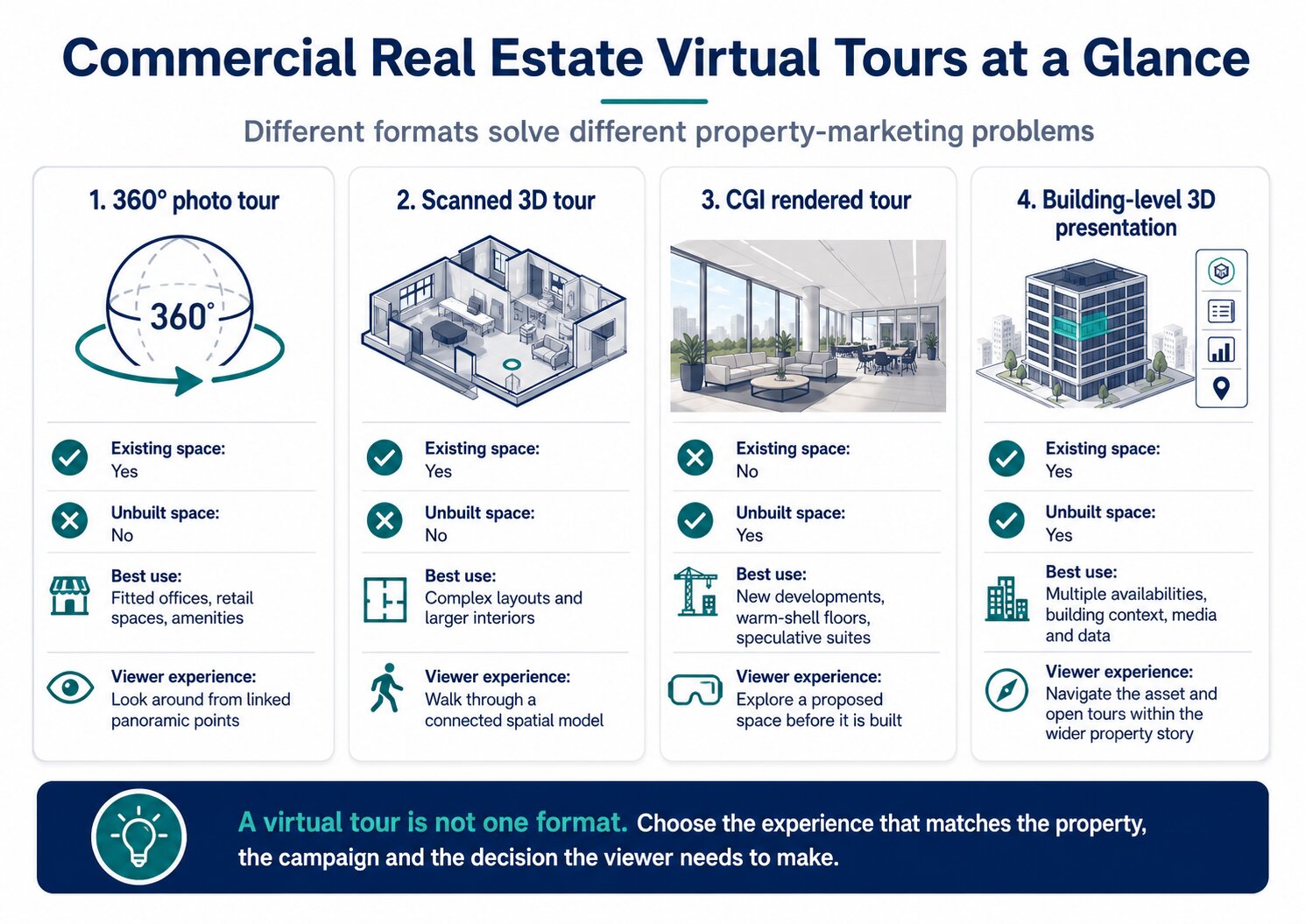
The term “virtual tour” covers several different formats. A linked 360° photo tour, a scanned 3D walkthrough and a CGI-rendered tour can all be useful, but they solve different problems. The right choice depends on what you are marketing, whether the space exists, and how much context the viewer needs.
This guide explains how real estate virtual tours work, the main formats used in commercial property, where they add value, what they cannot replace, and what to look for in virtual tour software. It also explains where an interactive building-level presentation such as Inspace 3D Stack fits into the process.
What is a virtual tour in commercial real estate?
A commercial property virtual tour is an interactive digital walkthrough that allows someone to inspect a space remotely from a phone, tablet or computer.
The key word is interactive.
A photograph shows the angle chosen by the photographer. A video follows the route chosen by the person filming it. A virtual tour lets the viewer decide what to inspect.
That can mean turning around inside a 360° panorama, moving between rooms, switching between floors, opening a dollhouse-style model, or exploring a rendered version of a future office.
In Australian commercial leasing, virtual tours are already used on live office availability pages. Dexus promotes virtual tours alongside office leasing opportunities, Melbourne Quarter provides virtual access to available floors and amenities, and 140 St Georges Terrace links 3D tours directly from its availability schedule.
Virtual tour vs video walkthrough
A video walkthrough and a virtual tour are not the same thing.
A video is passive. It is useful for storytelling, atmosphere and a fast overview, but the viewer watches the route in the order it was edited.
A virtual tour is self-directed. The viewer can stop, look around and choose the next space.
That distinction matters more in commercial real estate than in many residential listings. A tenant may want to examine workstation depth, meeting-room placement or sightlines. An investor may want to inspect common areas, access and building condition. A video can show those things, but only if the editor chose to include them.
What are the main types of real estate virtual tours?
The names used by vendors overlap, so it is better to understand how the experience is built than to rely on the label alone.
360° photo tours
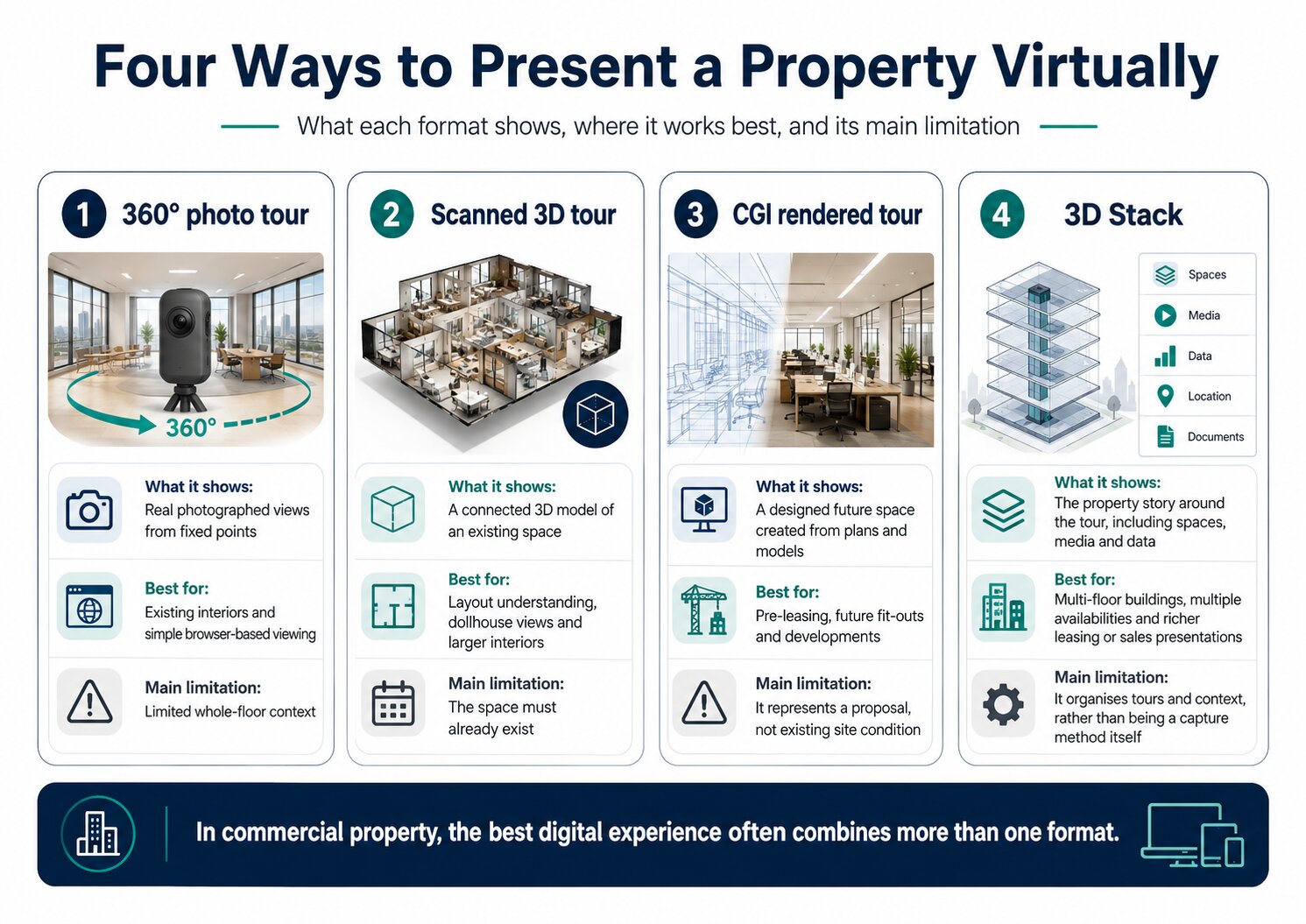
A 360° virtual tour is usually built from panoramic photographs captured at fixed points inside a real space. The panoramas are linked so the viewer can look in every direction and move between positions.
Best for:
Existing fitted offices, retail spaces, showrooms, amenities and straightforward commercial interiors.
Strengths:
Fast to understand, highly photographic, relatively simple to publish and easy to view in a browser.
Limitations:
The viewer normally moves between fixed capture points. Depending on the platform, there may be limited measurement or whole-floor spatial context.
Scanned 3D virtual tours
A scanned 3D tour uses spatial capture technology to create a connected model of an existing property. Matterport is the best-known example.
The viewer can usually move through the property in first person and also see a dollhouse or floor-plan-style overview. Some systems add measurements and floor plans.
Best for:
Complex layouts, larger commercial interiors, spaces where scale and relationship between rooms matter, and situations where a whole-property model is useful.
Strengths:
Better spatial understanding than linked panoramas alone, with model views and measurement features on some platforms.
Limitations:
The property needs to exist before it can be scanned. Capture and hosting requirements can also be more involved than a basic 360° tour.
CGI rendered virtual tours
A CGI virtual tour is created from architectural plans and 3D models rather than from photography of a finished space.
It lets prospects explore a proposed office, retail tenancy or development before construction is complete.
Best for:
New developments, speculative suites, warm-shell floors, future refurbishments and pre-leasing campaigns.
Strengths:
The space can be marketed before it physically exists. Layout, finishes, furniture and design intent can be shown in a more understandable way than a plan alone.
Limitations:
A render is a visual representation, not evidence of existing site condition. It should be presented clearly as a proposed or computer-generated view.
Interactive building-level 3D presentations
A virtual tour normally focuses on the interior experience. A building-level 3D presentation adds another layer: where the space sits inside the asset.
This can be useful when a campaign involves multiple availabilities, several floors, amenities, surrounding points of interest, documents, data and different media formats.
Inspace 3D Stack, for example, can combine an interactive 3D building model with virtual tours of existing or unbuilt spaces, galleries, data and collateral in one browser-based experience.
This is not a fourth capture method. It is a way of organising and presenting the virtual tours inside the wider property story.
What should a commercial property virtual tour actually help someone understand?
A good tour should answer more than “what does the room look like?”
Commercial property decisions depend on how the space works.
Scale and layout
The viewer should be able to understand how large spaces relate to each other.
For an office, that means the route from entry to work areas, meeting rooms, kitchen and breakout zones. For industrial property, it may mean warehouse depth, loading areas, office components and circulation. For retail, it can mean frontage, entry sequence and connection to surrounding trade.
A beautiful tour that hides the layout is less useful than it looks.
The relationship between the tenancy and the building
Prospects often need to know where a tenancy sits within the asset.
Which floor is it on? Where are the lifts? Which amenities are shared? Is there an end-of-trip facility? What other availabilities exist?
A room-level tour cannot answer every one of those questions on its own. Floor plans, building models and navigation between tours become more important as the asset gets larger.
The condition of an existing space
For existing property, a photographic tour should show the space honestly enough for a prospect to make an informed first assessment.
That includes finishes, daylight, columns, ceiling condition, existing fit-out and visible constraints.
The aim is not to make the physical inspection unnecessary. It is to help the right prospects decide whether the property deserves one.
The potential of an unbuilt space
A bare floorplate can be difficult to interpret. A 2D test fit helps, but not every decision-maker reads plans comfortably.
A CGI rendered tour can make the proposal easier to understand by showing furniture, room proportions, finishes and movement through the space.
This is where virtual tours connect naturally with the office fit-out process. The design team still needs proper drawings and specifications, but the leasing audience benefits from seeing what the proposed workplace could feel like.
What else matters
For commercial campaigns, the best experience may also need:
- Floor plans
- Availability schedules
- Building amenities
- Location and transport context
- Photography and video
- Leasing or investment documents
- Contact or enquiry options
- Branding
- Sharing controls
- Engagement analytics
A tour can be excellent on its own and still be incomplete as a commercial property presentation.
Where virtual tours create value in commercial real estate
Office leasing
Office leasing is one of the clearest uses.
A virtual tour lets a tenant shortlist floors before organising physical inspections. It also helps internal stakeholders who may not attend the first inspection.
That is particularly useful for interstate and overseas decision-makers, distributed management teams and occupiers comparing several buildings at once.
For fitted suites, the tour shows exactly what is there. For unbuilt or speculative suites, CGI can show a proposed workplace before delivery.
Industrial and logistics property
Industrial property is often harder to understand from conventional photography because the decision depends on scale and configuration.
A virtual tour can help prospects inspect warehouse volume, office areas, loading arrangements and internal circulation before travelling to site.
For large assets, pairing the interior tour with a building model, aerial context or site plan can be more useful than the tour alone.
Retail leasing
Retail prospects care about more than the tenancy interior.
Entry points, frontage, adjacent retailers, common areas and customer movement can matter just as much.
A virtual tour can show the tenancy itself, while a wider interactive property presentation can provide the surrounding centre context.
Asset sales
For investment sales, virtual tours can help buyers inspect assets earlier in the process, particularly when the buyer is interstate or offshore.
The tour is not a substitute for due diligence. It is a screening and presentation tool.
It can help a buyer understand the physical asset before deciding where to spend time, travel and advisory resources.
Pre-leasing and development
This is where rendered tours are most valuable.
A leasing team can market a future office or development before the space is physically available to inspect.
Instead of asking a tenant to interpret a plan, the campaign can show a navigable version of the proposed space and place it within the building.
What virtual tours cannot replace
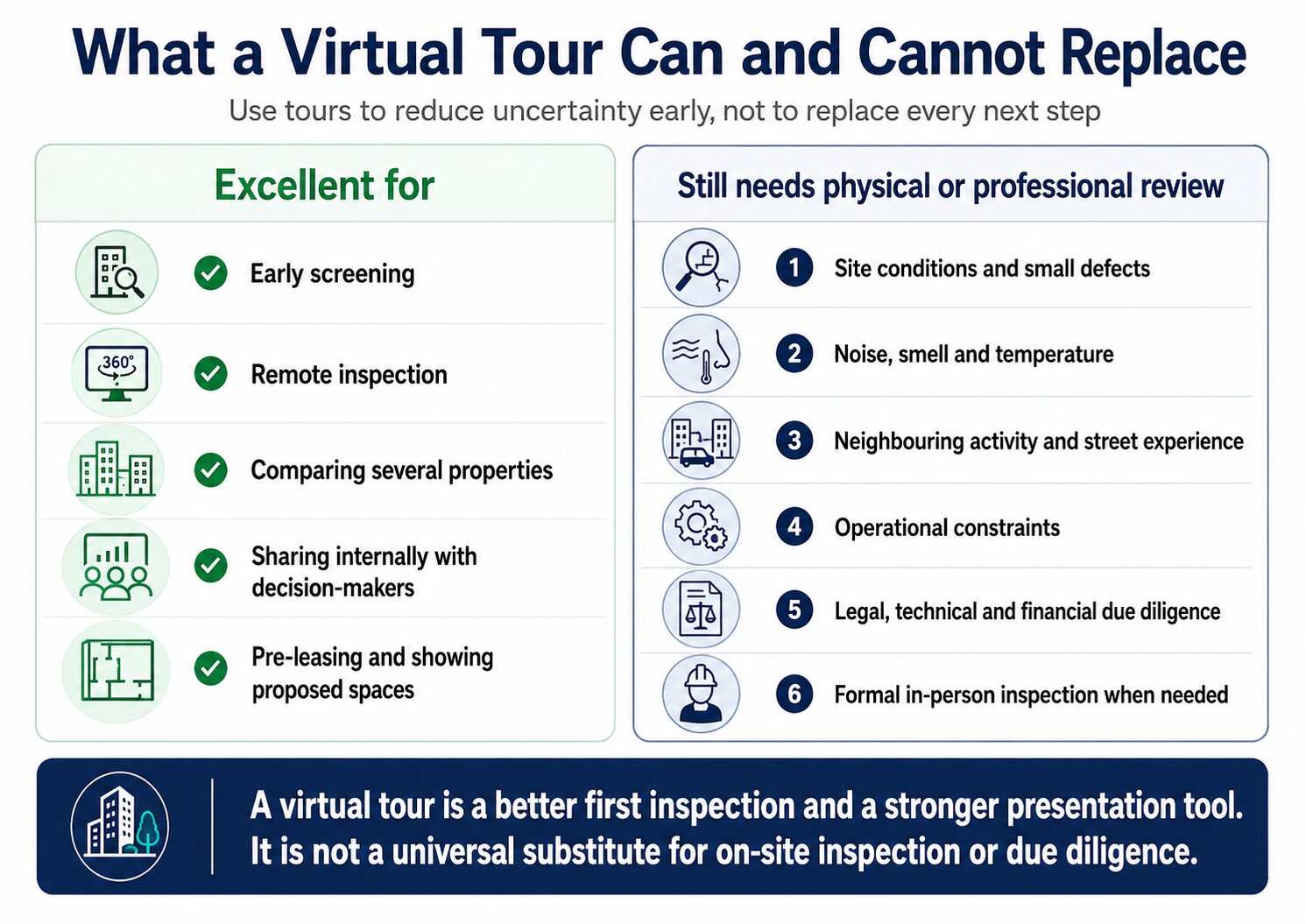
Virtual tours are useful because they reduce uncertainty early. They do not remove every reason to visit a property.
A physical inspection can still reveal things a screen cannot reproduce well:
- Noise
- Smell
- Temperature
- Neighbouring activity
- Street experience
- True daylight conditions
- Small defects
- Operational constraints that are not visible in the model
For investors and occupiers, technical, legal and financial due diligence also sits outside the virtual tour.
A tour should therefore be treated as a better first inspection and a stronger presentation tool, not as a universal replacement for on-site inspection.
There are exceptions. Inspace reports commercial deals where virtual presentation supported transactions without physical tours, but that should be understood as a campaign outcome, not a rule for every property or buyer.
How is a commercial real estate virtual tour created?
1. Define the job before choosing the technology
Start with the decision the tour needs to support.
Is the goal to lease an existing suite? Pre-lease an unbuilt office? Present a warehouse to offshore investors? Show several availabilities within one building?
The answer determines the format.
2. Prepare the property or source material
For an existing property, that means making the space presentable and confirming which areas will be captured.
For a rendered tour, it means supplying accurate architectural drawings, finishes, furniture layouts and design references.
3. Capture or model the space
Existing spaces are photographed or scanned from multiple positions.
Unbuilt spaces are modelled and rendered digitally.
The production method should match the type of tour promised to the viewer.
4. Build the navigation
A collection of panoramas is not yet a useful tour.
The positions need to be connected logically. Floor plans, labels, hotspots and menu structures should help the viewer understand where they are.
For larger commercial assets, navigation across floors and multiple spaces becomes a major part of the experience.
5. Quality-check the tour
Before publishing, check:
- Navigation works
- The viewer cannot accidentally enter irrelevant back-of-house areas
- Labels are correct
- The floor or suite name matches the availability schedule
- The tour loads properly on desktop and mobile
- Rendered spaces are identified appropriately
- No confidential material is visible
- Contact details and calls to action work
6. Publish and distribute it
A finished tour should not live in one forgotten link.
Use it on property websites, listing portals where supported, email campaigns, digital brochures, leasing presentations, follow-up messages and investor materials.
Inspace allows virtual tours created through its service to be used inside a 3D Stack, on websites and listings, or as standalone tours.
360° vs 3D vs CGI: which format should you choose?
Use a 360° photo tour when the property exists and the main job is to let people look around it quickly.
Use a scanned 3D virtual tour when the property exists and stronger spatial understanding, model views or measurement features matter.
Use a CGI rendered tour when the property does not yet exist, or when the campaign needs to show a proposed fit-out or future development.
Use a building-level interactive presentation when the prospect needs to understand more than one interior, including where spaces sit within the asset, what else is available and what supporting data or media belongs with each space.
The choice is not always either-or.
A major leasing campaign may use a 3D building model to navigate the asset, Matterport tours for fitted suites, CGI tours for future spaces, and photography for amenities.
The better question is not “Which technology sounds most advanced?”
It is “What does this prospect need to understand next?”
How to choose virtual tour software for commercial real estate
Most software comparisons focus on camera price and monthly subscriptions. Those matter, but commercial property teams should ask broader questions.
Can it handle the size and complexity of the asset?
A platform that works well for a two-bedroom home may become difficult when a building has several floors, ten availabilities and multiple amenity areas.
Can viewers use it without installing an app?
Browser-based access reduces friction, especially when links are being sent to executives, tenants, agents or investors who have never used the platform before.
Inspace 3D Stack is web-based and is designed to work across mobile, desktop, laptop, tablet and touchscreen devices without a download.
Can it show existing and unbuilt spaces?
If the portfolio includes developments or speculative suites, a platform that only scans finished property may force the team into separate experiences later.
Can you use the tour outside the platform?
Check whether the same tour can be embedded on websites, shared through listings and used as a standalone link.
This matters because property marketing rarely happens in one channel.
Can it connect the tour to the rest of the property information?
For commercial real estate, a tour often needs context.
The viewer may need the floor area, availability, photos, plans, building information, nearby amenities or investment documents while they are inspecting the asset.
A platform that connects these elements can reduce the need to send separate links and PDFs.
Does it provide useful analytics?
Basic page views are not the same as property engagement.
For a leasing or sales team, useful analytics can include which spaces were opened, which tours attracted attention and how individual tracked links were used.
Inspace 3D Stack supports tracked links and engagement metrics for assets and virtual tours.
Can it scale across a portfolio?
A one-off tour and a national portfolio are different operational problems.
Teams managing many assets should think about naming conventions, updates, access, brand consistency, analytics and whether one platform can organise multiple buildings.
How to use virtual tours in a leasing or sales campaign
Put the tour where the property is discovered
If a prospect has to ask for the tour, it is already doing less work than it could.
Place it prominently on the property website and relevant listing pages. Australian examples from Dexus, Melbourne Quarter and 140 St Georges Terrace show virtual access being used directly in commercial leasing journeys.
Use it before the physical inspection
Send the tour with the first property information.
That lets prospects reject obvious mismatches and arrive at an inspection with better questions.
Use it after the inspection
A virtual tour becomes even more useful after someone has visited.
The prospect can revisit the layout, share the property internally and compare it with other shortlisted options without arranging another site visit.
Use it in internal decision-making
Commercial property decisions often involve people who never attend the inspection.
A CFO, interstate director, workplace consultant or investment committee can use the same tour to understand what the local team saw.
Pair it with the evidence that explains the property
This is where a tour can become part of a stronger digital presentation.
Instead of sending one tour link, one PDF, one floor plan and a separate photo gallery, the campaign can bring those pieces into one property experience.
How Inspace 3D Stack extends a virtual tour
A virtual tour answers an interior question: what is it like inside this space?
A building-level 3D presentation answers a broader set of questions: where is the space within the asset, what else is available, what amenities belong to the building, and what information should the prospect see next?
That is the role of Inspace 3D Stack.
3D Stack creates an interactive virtual replica of a commercial property and uses the building itself as the navigation. A prospect can explore the asset, select a floor or space, open a virtual tour, view galleries and videos, inspect data and supporting information, and understand the surrounding location from one browser-based experience.
It is useful because commercial property rarely has only one piece of content to present. A leasing campaign can have several available floors, fitted suites, speculative suites, amenities, floor plans, photography, rendered concepts and location information. Sending each item as a separate link puts the work on the prospect. A 3D Stack puts those pieces around the asset and shows how they relate.
What can sit inside a 3D Stack?
A 3D Stack can bring together:
- Interactive 3D asset models
- Virtual tours of existing spaces
- CGI rendered virtual tours of unbuilt spaces
- Availability and property data
- Photography, galleries and video
- Floor plans and other collateral
- Context maps and nearby points of interest
- Amenities and surrounding areas
The important distinction is that 3D Stack is not a replacement for a Matterport scan, 360° tour or CGI tour. Those are ways to create the interior experience. The 3D Stack is the building-level presentation that organises those experiences and connects them to the rest of the property.
For a simple single-suite campaign, a standalone virtual tour may be enough. For a multi-floor office building, industrial estate, shopping centre or investment sale, the prospect often needs the building context as well.
Why building-level navigation matters
Consider a ten-storey office building with three availabilities.
A prospect viewing three isolated virtual-tour links has to remember which floor each tour belongs to, compare the areas separately and then return to another brochure or website for amenities and building information.
Inside a 3D Stack, the building becomes the index. The prospect can select the available floor, understand its position in the asset and open the relevant media from there.
That is a small interface decision, but it solves a real commercial-property problem: orientation.
The same approach works when the space is not built yet. Existing fitted suites can use photographic or scanned tours, while future suites can use CGI rendered tours within the same building presentation. The viewer does not need to understand which production technology created each experience. They can simply explore the opportunities available in the asset.
Personalised sharing and engagement analytics
The value of a 3D presentation continues after the prospect opens it.
Inspace 3D Stack supports tracked links that can be created for individual visitors. Teams can tailor what information a prospect sees, add a personal welcome message and use password protection where required.
The platform also provides engagement data for each 3D Stack, including where traffic comes from and which assets, spaces and virtual tours receive attention.
For a leasing or sales team, that creates a useful feedback loop. A tour is no longer only a visual asset. It can also show which parts of the opportunity are attracting interest.
The 3D Stack is therefore best understood as the presentation layer around the virtual tour. It gives the viewer the building context and gives the property team a way to package, share and measure the wider digital experience.
Explore Inspace 3D Stack to see how virtual tours, asset data and media can be combined in one building-level presentation.
From one building to an entire portfolio: Inspace Digital Portfolio
A 3D Stack solves the presentation problem at asset level. Inspace Digital Portfolio takes the same idea to portfolio level.
Instead of opening separate property websites or presentations, a prospect can explore multiple assets through one digital mapping experience. Each asset can be represented by its own 3D Stack, with the associated virtual tours, data, media and documents available from the portfolio view.
This is particularly relevant for owners, fund managers and agency teams marketing more than one asset at a time.
What a Digital Portfolio adds
The Digital Portfolio can combine:
- A map showing assets across a market, region or global portfolio
- A 3D Stack for each asset
- Virtual tours of existing and unbuilt spaces
- Portfolio-level and asset-level data
- Media galleries and video
- Reports and supporting documents
- Contextual maps and points of interest
- Tracked links and visitor-level personalisation
- Portfolio engagement analytics
The difference is scale.
With a standalone virtual tour, the unit of presentation is the space.
With a 3D Stack, the unit of presentation is the building or asset.
With a Digital Portfolio, the unit of presentation can be an entire group of assets.
That hierarchy is useful because different commercial-property conversations start at different levels. A tenant may begin by comparing several buildings. An investor may want to understand a fund or portfolio before opening individual assets. A national leasing team may need one place to present opportunities across several cities.
A Digital Portfolio lets those users start broad and then move into the detail rather than receiving a collection of disconnected links.
Portfolio data without falling back to static PDFs
Virtual tours are visual, but portfolio decisions also depend on information.
Inspace Digital Portfolio allows data to be presented at portfolio and individual-asset level, with reports and documents attached to the experience. That means a user can move from a map or portfolio overview into a specific asset, inspect its 3D Stack, open a virtual tour and review the supporting material without leaving the presentation.
For investor relations and asset sales, this can be especially useful because the story is rarely only about one space. Geography, portfolio composition, asset quality, leasing status and supporting reports all sit alongside the physical property.
Scaling the experience across teams
Portfolio presentation also creates an operational problem that a one-off virtual tour does not.
As the number of assets grows, teams need consistent data, access controls, branding, updates and analytics. Inspace Digital Portfolio supports portfolio-level content management, user permissions, data and access management, global teams and different business lines.
That matters if virtual property presentation is being treated as an ongoing system rather than a single campaign asset.
The practical takeaway
A virtual tour should not be chosen in isolation from the level of property story you need to tell.
If the viewer only needs to inspect one existing suite, a standalone 360° or scanned 3D tour may be enough.
If the viewer needs to understand several spaces inside one building, Inspace 3D Stack adds the building-level context.
If the viewer needs to compare and explore multiple assets, Inspace Digital Portfolio adds the portfolio-level layer and connects each asset back to its own 3D Stack.
That structure gives commercial property teams a simple way to think about the technology:
Space → virtual tour
Asset → 3D Stack
Portfolio → Digital Portfolio
Request a demo to see how Inspace can connect virtual tours, 3D Stacks and a Digital Portfolio into one commercial property presentation.
Frequently asked questions
What is a virtual tour in real estate?
A real estate virtual tour is an interactive online walkthrough that lets a buyer, tenant or investor explore a property remotely. Unlike photos or video, the viewer controls where they look and, in most tours, how they move between spaces.
What is the difference between a 360° tour and a 3D virtual tour?
A 360° tour usually links panoramic photographs captured from fixed points. A scanned 3D virtual tour creates a connected spatial model of the property and may add dollhouse views, floor plans and measurement tools. The terms are sometimes used loosely, so check what the platform actually produces.
Can virtual tours be created before a property is built?
Yes. CGI rendered virtual tours can be created from architectural plans and 3D models, allowing prospects to explore a proposed office, retail space or development before construction is finished.
Do virtual tours require a VR headset?
Usually not. Most modern property tours are designed to run in a standard web browser on desktop, mobile or tablet. Some platforms may support VR headsets, but they are not required for the normal viewing experience.
Can a virtual tour replace an in-person commercial property inspection?
Not in every case. A tour is excellent for early screening, remote inspection and internal sharing, but an in-person visit may still be important for noise, site operations, small defects, neighbourhood experience and formal due diligence.
What should commercial real estate virtual tour software include?
Look for reliable browser access, strong navigation, mobile support, the ability to share or embed tours, support for the property formats you need, and clear hosting terms. For larger commercial campaigns, also consider integration with floor plans, availability data, media, analytics and portfolio-level management.
What is the difference between a virtual tour and a digital twin?
A virtual tour is primarily an experience for exploring a space remotely. A digital twin is a broader digital representation of a physical asset that can include geometry, data and operational information. Some scanned 3D tours are described as digital twins, but not every virtual tour meets that broader definition.
Sources:
Inspace 3D Stack
Product capabilities checked: interactive 3D asset models, virtual tours of existing and unbuilt spaces, galleries, data, tracked links, engagement analytics, browser-based access and multi-device support.
Inspace Digital Portfolio
Product capabilities checked: global portfolio mapping, 3D Stacks for individual assets, portfolio and asset-level data, media and virtual tours, tracked links, engagement analytics, reports and documents, user permissions, access management and support for global teams.
Inspace Virtual Tours
Product capabilities checked: Matterport tours for existing spaces, CGI rendered tours for unbuilt spaces, use inside 3D Stack, use on websites and listings, and standalone use.
Dexus office leasing pages
Australian commercial leasing examples showing virtual tours offered alongside office availability.
Melbourne Quarter
Australian commercial leasing example providing virtual access to available office floors and building amenities.
140 St Georges Terrace
Australian office leasing example linking 3D tours directly from its availability schedule.
CBRE: Virtual Tours Make Real Estate Decisions Possible
Used as an authoritative industry reference for the role of virtual tours in office, industrial and retail property.
Matterport and current 2026 virtual-tour software guides
Used to cross-check terminology around scanned 3D tours, dollhouse views, floor plans, measurement tools and browser-based property exploration.

%201.svg)